For Windows 10 and 11
Stubbook
A checkbook register for your PC that works like paper: one line per check, and the balance on every line.
- Stays on your PC
- No account
- No internet connection at all
- No ads
How it works
Write it the way you write it
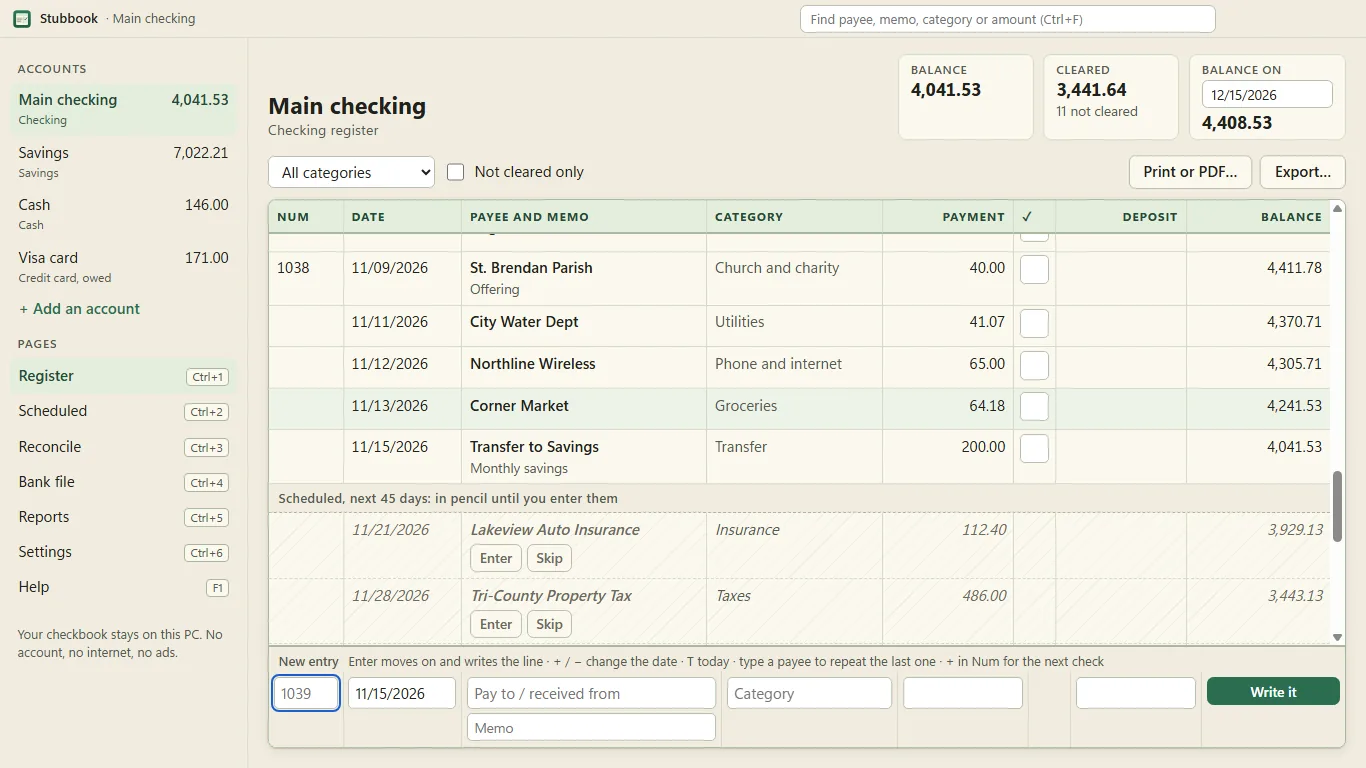
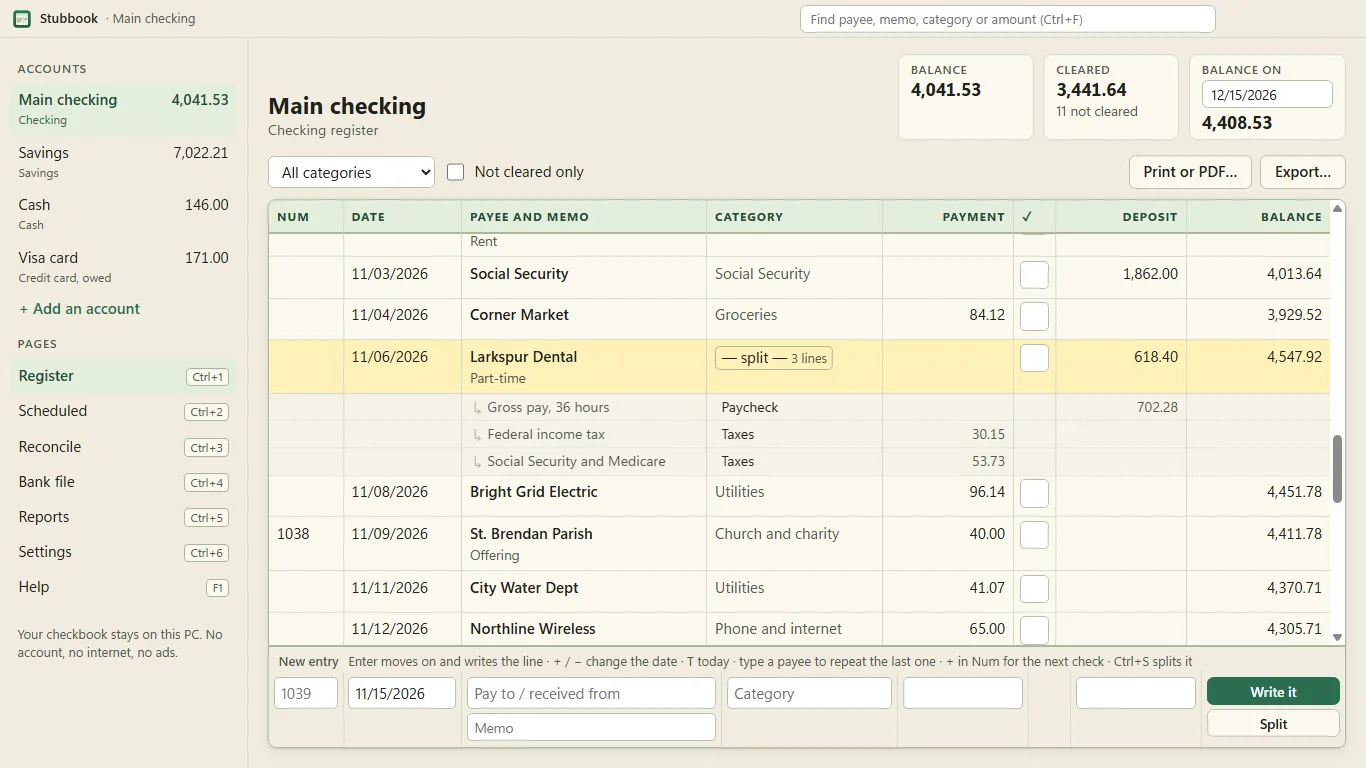
If you keep your checkbook by hand, Stubbook is the same register on your PC: check number, date, payee, memo, payment, the cleared tick, deposit, and the balance on every line. You type it the way you write it, and it does the arithmetic.
Write each entry
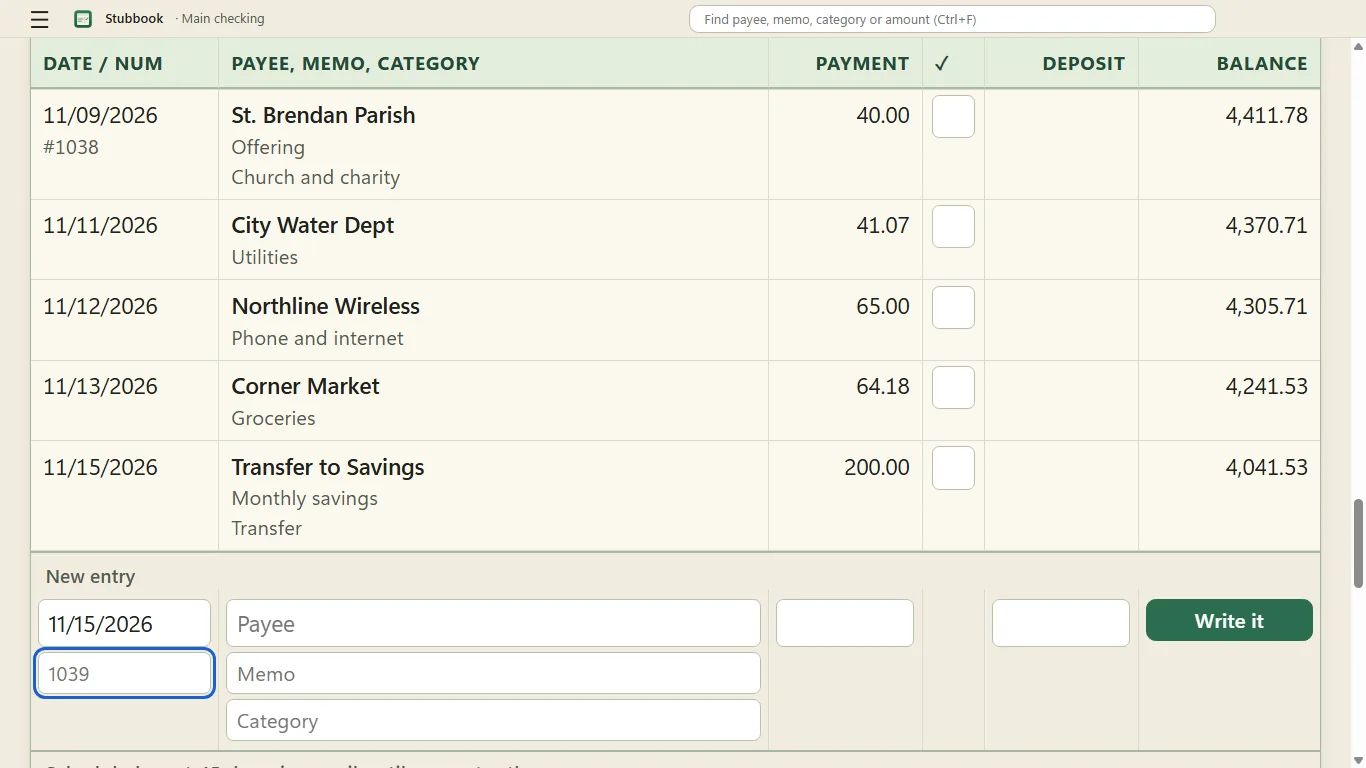
The New entry line is at the bottom, like the next empty line on paper. Enter moves to the next box and writes the line.
Tick what the statement shows
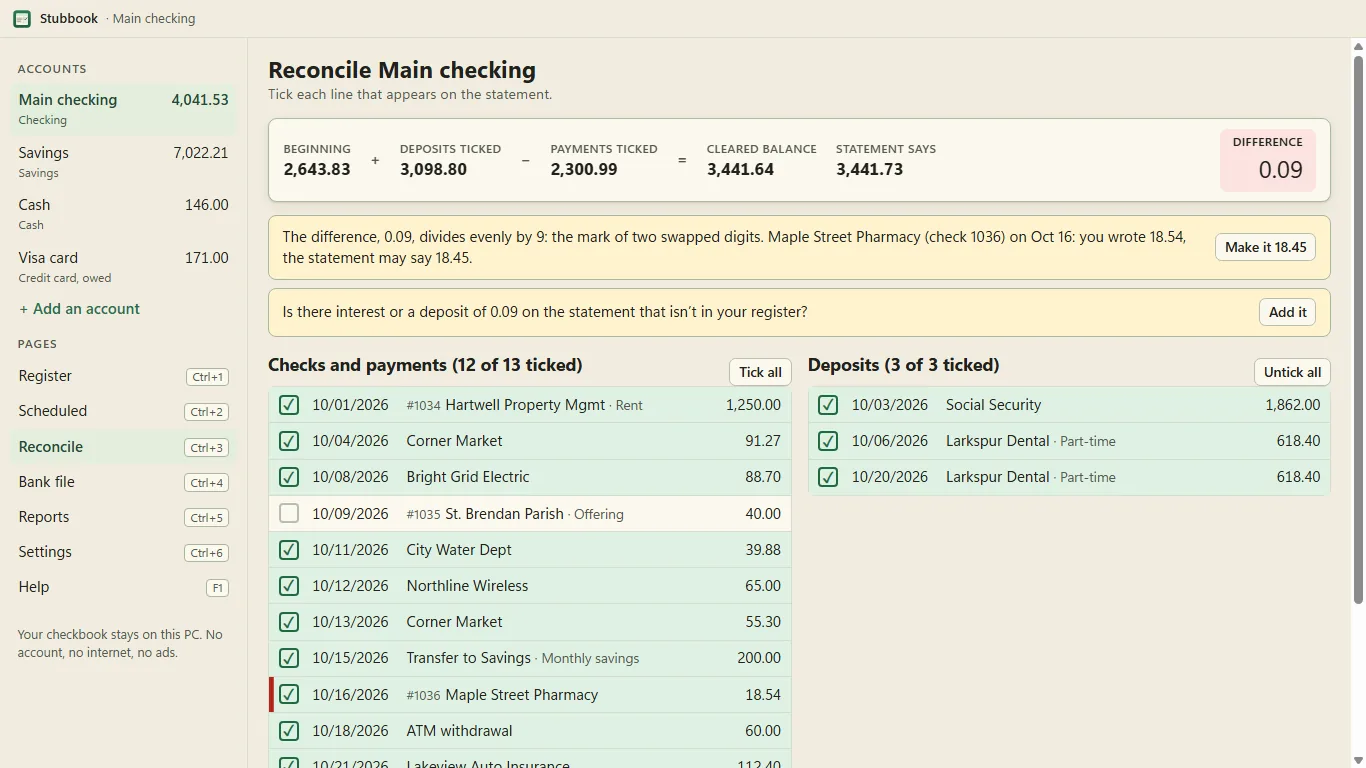
When the bank statement comes, tick what it shows. If it won't balance, Stubbook tells you why: the entry you haven't ticked that equals the difference, the amount you wrote twice, the two digits you swapped, the payment you put in as a deposit.
Bring in your bank's file
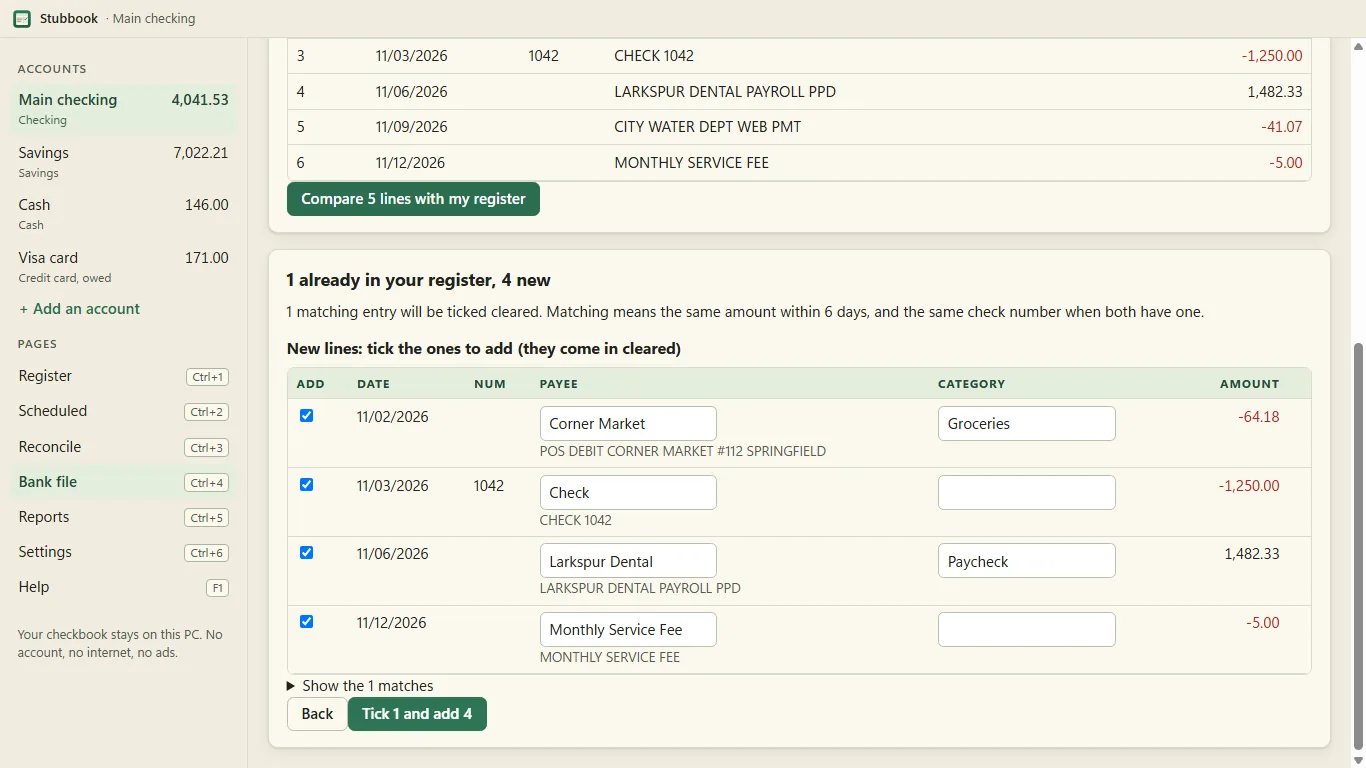
Bring in your bank's CSV or a Quicken QIF file. Matches get ticked; nothing is added without you.
What it does
A register that does the arithmetic
Opens your bank's file
Double-click the QFX, OFX, QBO or QIF download and Stubbook ticks what you wrote, lists what you didn't, and shows the bank's balance beside yours. How it works.
Four kinds of account
Checking, savings, cash and credit card registers. Transfers between them are one entry, seen in both.
Keyboard first
Enter moves along the line, + and − change the date, + in Num gives the next check number, and a payee you've used fills in its last amount and category.
Edit in place
Edit any line in place. Undo and redo. Overdrawn balances turn red from the line where it went under.
Scheduled entries
Rent, paychecks and loan payments, weekly to yearly, with month ends handled, and the balance on any date ahead.
Reconcile with a report
Reconcile against the paper statement with a live difference, the likely causes, and a one-page report when it balances.
CSV and QIF in and out
Bank CSV from any bank (columns mapped once and remembered, US and European formats) and QIF from Quicken or Microsoft Money. CSV and QIF out, and a register that prints like paper.
Find and totals
Find by payee, memo, category or amount. Category totals by month for the year.
Backups
A dated backup every day you use it, and a backup file you can keep anywhere.
Where will my balance be
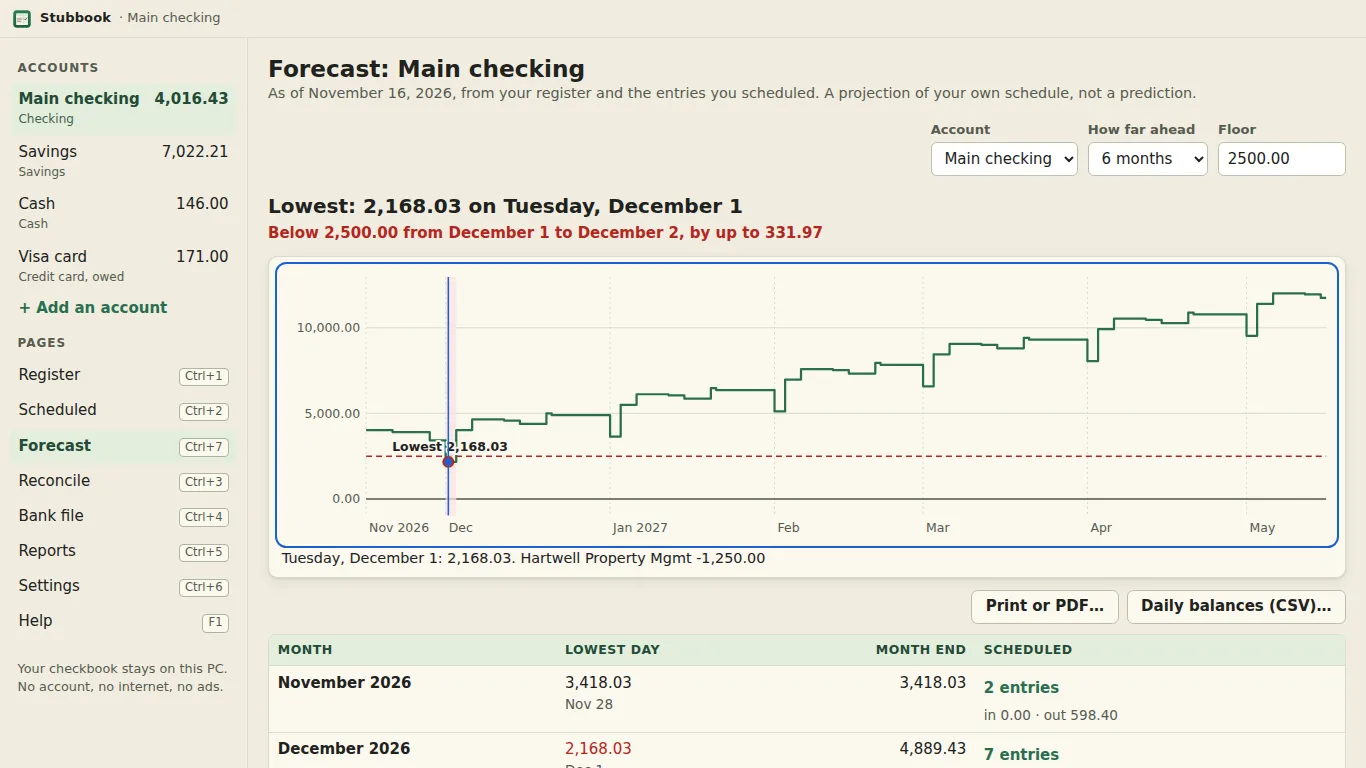
Every day of the next 1 to 24 months from your register and your scheduled entries, the lowest day named, and when it goes under the floor you set. Try a change without saving it.
Split one entry between categories
The mortgage payment's principal, interest and escrow, or a paycheck's gross pay and deductions, on one line with the bank's amount.
Big text, dark mode, high contrast
Text up to twice the size, dark mode and high contrast.
- Text from 100% to 200%
- Light, dark and high contrast
Pricing
One purchase, no subscription
The Microsoft Store gives 7 days to try everything. Buying it once keeps it.
Stubbook
$6.99 once
With a 7-day free trial from the Store.
- No subscription and nothing to renew
- No account, no ads
Privacy
Your checkbook stays on your PC
- Stays on your PC
- No internet connection at all
- No account, no bank login
Stubbook makes no network requests of any kind: no sign-in, no sync, no analytics, no crash reports, no advertising. It never asks for a bank login, a card number or an account number. Bank files you bring in are read on your PC, and it keeps the entries you accept, not the file. Privacy policy
Questions
Common questions
My statement won't reach 0.00
Stubbook checks the usual mistakes: an unticked entry equal to the difference, the same amount entered twice, a difference that divides by 9 (two digits swapped, with the likely line shown), and a difference that is twice an entry (a payment entered as a deposit). Off by 0.09? That divides by 9, so Stubbook shows you which check.
How do I bring in my bank's file?
Most banks let you download your account activity as a CSV file. In Stubbook choose Bank file (Ctrl+4) and pick the file. Check which column is the date, the description and the amount once; Stubbook remembers that bank's layout. Lines that match something you already wrote are ticked cleared; new ones are listed for you to accept. The QFX or OFX file a bank labels “Quicken” or “Microsoft Money” carries the bank's balance and its own number for each line: how Stubbook opens it.
Can I move from Quicken or Microsoft Money?
Export a QIF file there (Quicken: File › Export › QIF; Money: File › Export, Loose QIF) and choose it the same way. Every account in the file comes in, and entries Quicken had reconciled stay reconciled.
How do I move to a new PC?
A dated copy is saved each day you use Stubbook (Settings › Backups shows the folder). Save a backup file to a USB stick now and then: on a new PC, install Stubbook and choose “Restore a Stubbook backup” on the first screen.
Is there a trial, and a subscription?
The Microsoft Store gives 7 days to try everything. Buying it once keeps it; there is no subscription and nothing to renew.
More in Stubbook help, bank files, splits and the forecast, or write to hello@tomorrowish.dev. If a bank file won't read, say which bank, and if you send a sample, remove the account numbers first.
En français : Stubbook, un livre de comptes pour Windows.
Keep your checkbook on your PC
On the Microsoft Store for Windows 10 and 11. No account, no internet needed.