Stubbook help
Where will my balance be?
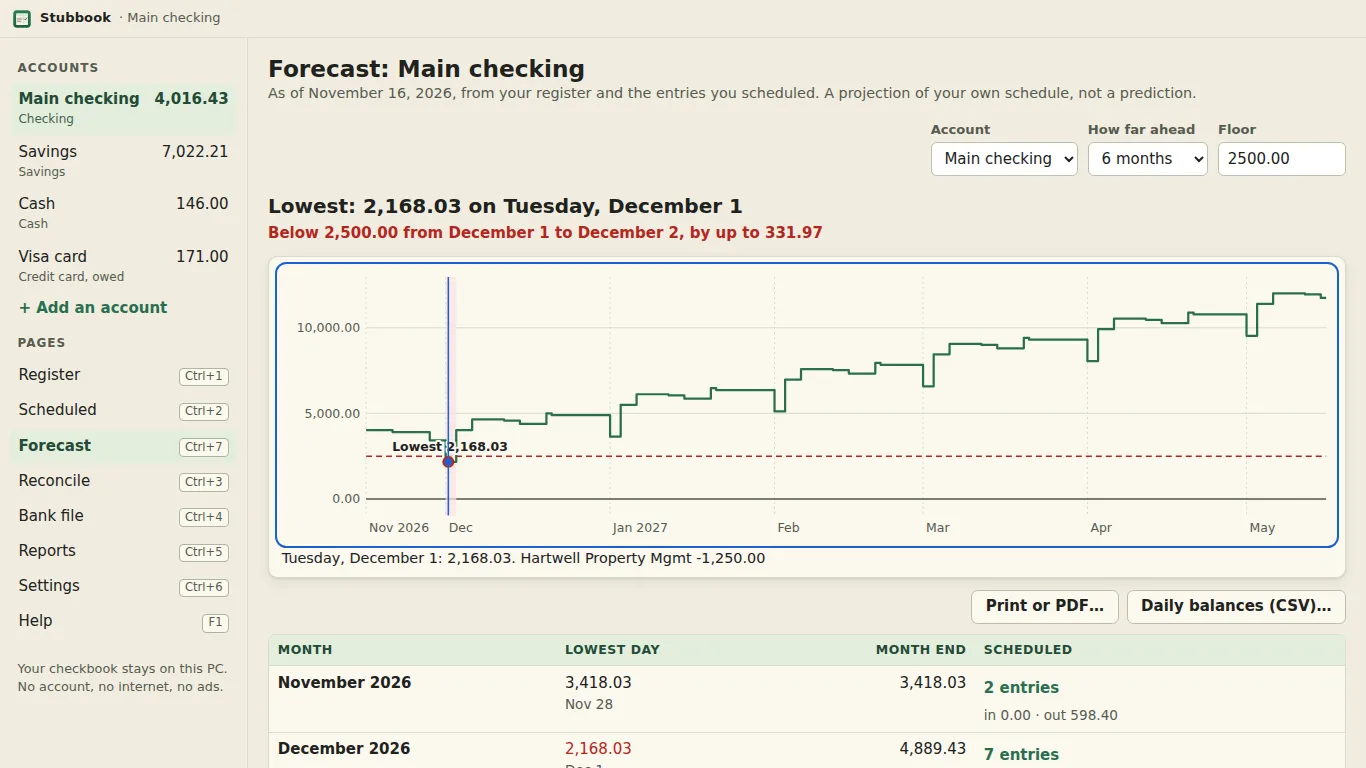
The Forecast page (Ctrl+7) draws your balance at the end of every day for the next 1 to 24 months, a year unless you choose otherwise. Above the chart it names the lowest day ("Lowest: 412.18 on Tuesday, December 1") and, when the balance goes under your floor, from when to when and by how much. It is a projection of the entries you scheduled, as of today. It is not a prediction and not advice.
What it counts
- The register as it stands today: every entry you wrote, cleared or not. An entry you dated later (a post-dated check) counts on its own day.
- Every scheduled entry in the window: rent, paychecks, bills, loan payments, from every week to every year, with end dates, counts and paused entries honoured, and the same dates the register shows in pencil. A split scheduled entry counts by its total. A scheduled transfer moves money from one account to the other; in "All accounts" it nets to nothing.
- Overdue scheduled entries: one that was due before today and that you neither entered nor skipped is counted today, and the page says so ("3 scheduled entries are overdue and counted today"). Enter or skip it in the register and the forecast follows.
It gives the same number as the register's "Balance on" box for every day: both add the same pencilled rows.
What it doesn't count
Anything you haven't scheduled. Groceries, gas and the odd repair aren't in it unless you schedule them (an estimate of the month's groceries as a monthly entry works). Bank files and Microsoft Money's QIF files bring in what already happened, not what is coming, so a book made from them starts with nothing scheduled: the page says so and offers "Schedule an entry".
The floor
The floor is the balance you'd rather not go under: 0.00 unless you set one. Type it in the Floor box; it is kept for that account in your checkbook file. A dashed line marks it on the chart, the days under it are shaded, and the line above the chart says when ("Below 500.00 from March 3 to March 9, by up to 212.40"). A credit card has no floor unless you give it one; its page shows the most owed instead of the lowest balance.
Reading the chart without a mouse
Tab to the chart, then the Left and Right arrows walk a day at a time, Page Up and Page Down a month, Home and End the first and last day, and L jumps to the low point. Each day reads out its date, balance and what moved it (Narrator reads it too). Under the chart a table gives the same numbers month by month: the lowest day, the month-end balance, and what is scheduled that month.
Try a change without saving it
Under the chart, untick a scheduled entry to see the line without it, change one scheduled amount, or add a one-off ("Car repair, 900.00, December 20"). A banner says your book is unchanged while you try; Reset puts everything back. Nothing is written until you press Add to schedule on a one-off, and Undo (Ctrl+Z) takes that back too.
On paper and in a spreadsheet
Print or PDF gives one page: the chart, the low point and the month-by-month table, dated (Letter in English, A4 in French). Daily balances (CSV) saves one row per day with the balance, the change and what moved it.
More: Stubbook help · split entries · open the file your bank gives you · hello@tomorrowish.dev