Day out of Days: what it is, the codes, and a free template
A Day out of Days is a grid with the cast down the side and the shoot days across the top. Each square says what that actor is doing that day: starting, working, waiting on hold, or finishing. Producers use it to see what each actor will be paid for, and ADs use it to spot days that could be moved to save holds.
Download
- Blank Day out of Days template (PDF, landscape)
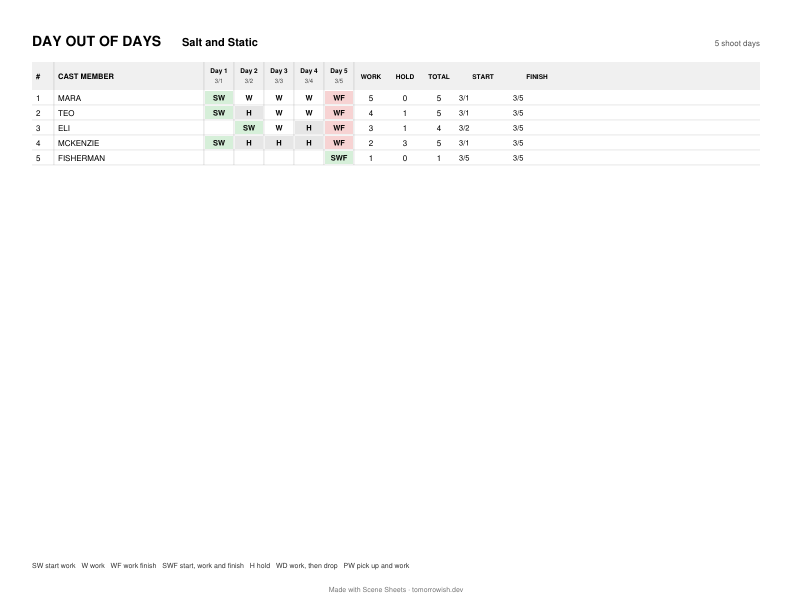
- Example for a 5-day sample shoot (PDF) and the same as CSV
The codes
| Code | Means |
|---|---|
| SW | Start work: the actor's first day. |
| W | Work. |
| WF | Work finish: the last day. |
| SWF | Start, work and finish on the same day (a one-day part). |
| H | Hold: between the first and last day, not working, still paid. |
| WD, PW | Work then drop; pick up and work. Used when the actor is let go during a long gap and brought back later instead of being held. |
| TR, FT, R | Travel, fitting and rehearsal days, when you schedule them. |
Codes as Movie Magic Scheduling uses them (EP's Movie Magic documentation, read October 24, 2026), which most schedules follow.
How it is worked out
For each actor, take the shoot days that contain one of their scenes. The first is SW, the last is WF (or SWF if there is only one). Every day in between is W if they work it and H if they don't. The totals at the right are work days, hold days and the two added together, which is roughly the number of days you pay.
Drop and pick up. If the gap between two work days is long, it can cost less to let the actor go and bring them back. Union rules decide when that is allowed. SAG-AFTRA's rule for US film and TV work is commonly given as a gap of more than 10 days (14 elsewhere), once per production; check the agreement you are actually working under. Scene Sheets has a switch that uses drop and pickup when a gap is longer than 10 days (calendar days when your shoot days have dates).
Fewer holds, cheaper shoot
Look along each row for H. A hold usually means one scene with that actor was scheduled away from the rest. Moving it next to their other days (or moving the others) removes the hold. In the example above, scene 22 puts McKenzie on day 1 while her other scene is on day 5, which costs three hold days; moving scene 22 to day 5 removes them.
Make one from your script
On the Scene Sheets page, open your script, accept the cast, and put scenes into shoot days (drag the strips or use "Fill days by set"). The Day out of Days fills in as you go, on screen, for free.
More: breakdown sheet · how to break down a script · Day out of Days · call sheet template · Fountain to PDF · free breakdown software compared
Not affiliated with Final Draft, Entertainment Partners (Movie Magic), Jungle Software (Gorilla), StudioBinder or the Fountain project. Sample pages use a short script written for this tool; the people and places in it are made up.