Help · Paid Up 1.3
Payoff plan: your debt-free date
Your cards and loans are already bills in Paid Up. Give one a balance and a rate and the same bill book works out the month you're debt-free, how much interest that costs, and when each debt is paid off. Every payment you mark paid moves the plan along with the real balance.
No Windows PC, or want to try the numbers first? The same arithmetic runs free in your browser: try it in your browser (nothing you type leaves the page).
Turn a bill into a debt
Open a bill (cards and loans live under Loans & cards) and tick This is a debt I'm paying off. Four things to type:
- Balance today: what you owe now.
- APR %: the yearly rate. Money owed to family or a medical bill with no interest: 0.
- Intro rate (optional): a rate, usually 0%, and the date it ends. After that date the APR applies.
- The minimum: the bill's own amount (a loan's fixed payment), or a percent of the balance with a smallest payment (cards; 2% and at least $25 to start with). Cards that say "1% plus interest" have a box for that.
Nothing else about the bill changes: its reminders, the desktop widget and Find my bills work as before. Payoff plan then shows up in the sidebar (Ctrl+6).
What the plan shows
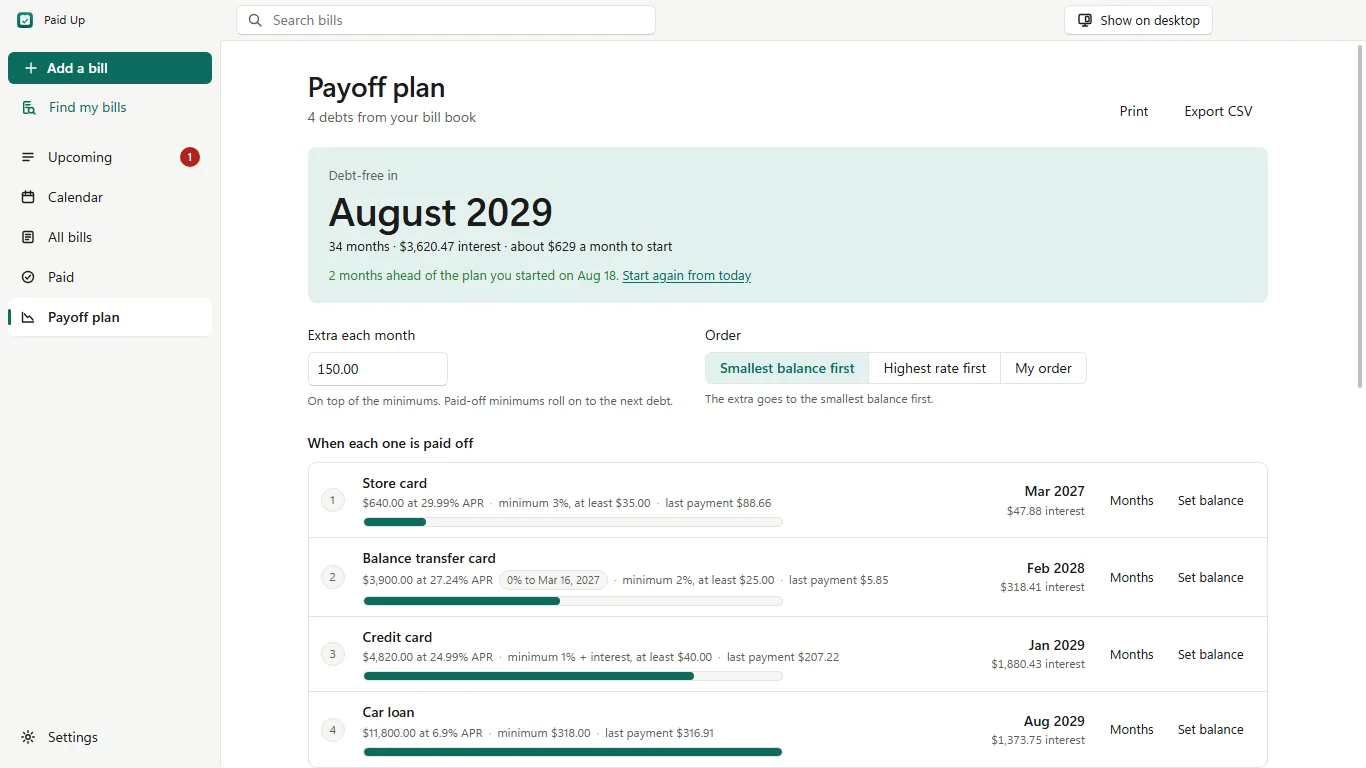
- The debt-free month, the total interest, and one row per debt with the month it's paid off, its interest and its last payment.
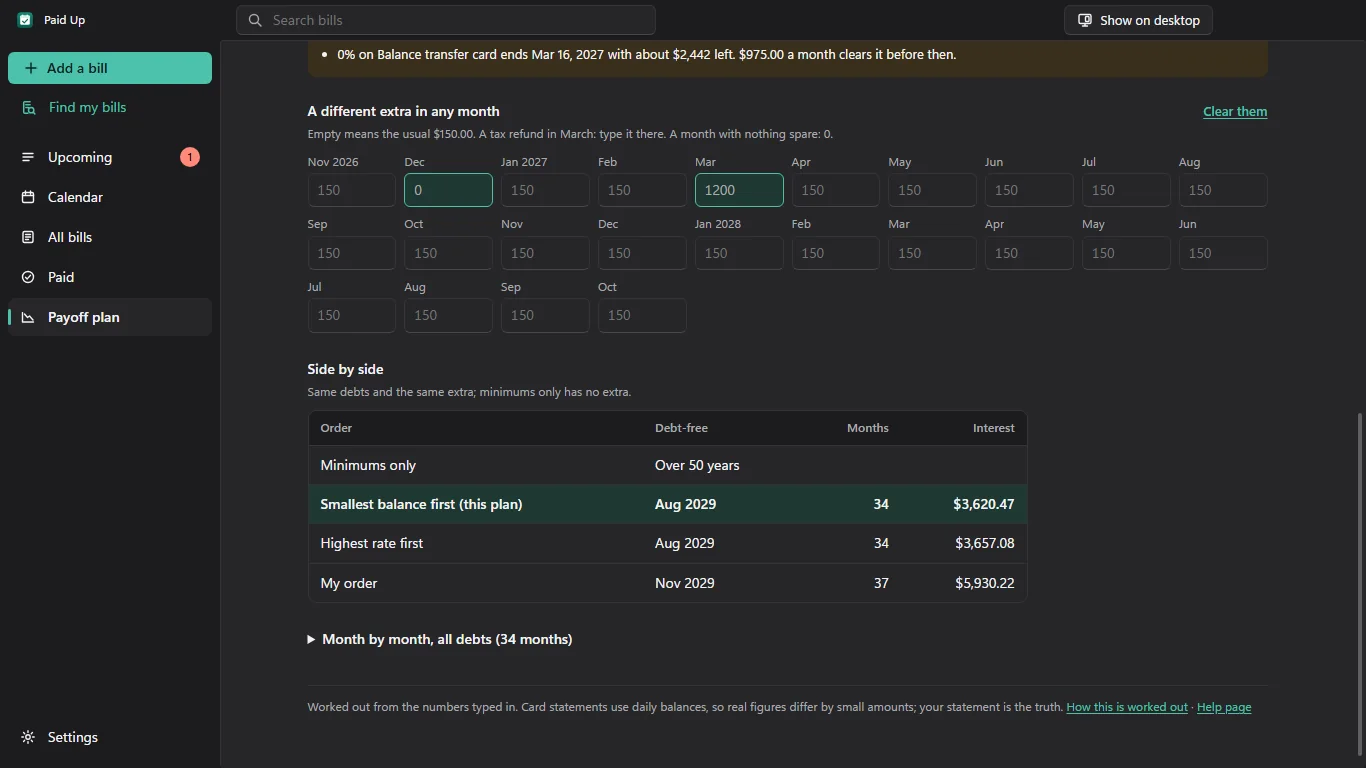
- Extra each month: one amount on top of the minimums. Below it, the next 24 months, each of which can have its own extra: a tax refund in March, nothing spare in December.
- Order: Smallest balance first (the "snowball"), Highest rate first (the "avalanche"), or My order (drag the debts, or Alt+↑ / Alt+↓ on one).
- Side by side: minimums only, smallest balance first, highest rate first and your order, with the months and the interest for each. It doesn't pick one for you.
- For every intro rate: what's left when it ends, and the monthly payment that would clear it before then.
- Month by month, for all debts together or for one: what's paid, the interest and what's owed after.
- Print (one black-and-white page with the order, the dates and the totals) and Export CSV (the month-by-month table).
How it's worked out
Each month, for each debt that still owes something:
- Interest goes on first: balance × APR ÷ 12, rounded to the cent. While an intro rate applies, that rate is used instead: it counts in a month while the bill's due day that month is on or before the date the intro rate ends.
- The minimum is paid: the bill's amount, or the percent of the balance (after that month's interest, plus the interest itself if the card says "plus interest"), but at least the smallest payment. Never more than what's owed, so the last payment is usually smaller.
- The total paid each month stays what the minimums came to in the first month, plus the extra. After the minimums, the rest goes to the first debt in the order, and anything left over to the next one, the same month. When a debt is paid off, its minimum keeps going to the next debt from the following month; when a card's minimum shrinks with its balance, the difference goes there too.
Smallest balance first orders the debts by their balances when the plan starts. Highest rate first looks at the rate each debt charges that month, so a 0% card moves up the day its intro rate ends. Minimums only has no extra and nothing moves on.
A worked example
Two cards, starting in December 2026, smallest balance first, $100 extra a month:
- Store card: $640.00 at 26.99%, minimum 3% of the balance, at least $35.00, due on the 20th.
- Visa: $2,400.00 at 29.24%, minimum 1% of the balance plus interest, at least $35.00, due on the 12th.
| December 2026 | Owed | + Interest | Paid | Owed after |
|---|---|---|---|---|
| Store card | $640.00 | 640.00 × 0.2699 ÷ 12 = $14.39 | $35.00 minimum + $100.00 extra = $135.00 | $519.39 |
| Visa | $2,400.00 | 2,400.00 × 0.2924 ÷ 12 = $58.48 | 1% of $2,458.48 = $24.58, + $58.48 = $83.06 | $2,375.42 |
| Total | $72.87 | $218.06 | $2,894.81 |
In January the Visa's minimum is $82.21 (its balance went down), so the $0.85 difference goes to the store card with the extra: $135.85. The store card is paid off in May 2027, and from June the whole $218.06 a month goes to the Visa, paid off in May 2028: debt-free in 18 months, $714.59 of interest in total. Highest rate first (the Visa first) also finishes in May 2028, with $701.18 of interest.
These figures come from the same independent check the app's arithmetic is tested against, to the cent, every month. The browser version gives the same figures for the same debts.
Intro rates
A balance transfer card: $3,900.00 at 0% until 14 March 2027, 27.24% after, minimum 2% (at least $25), due on the 14th, $150 extra a month from December 2026. The 0% counts in December, January, February and March (the 14th of March is the last day). The plan says: 0% on Balance transfer ends Mar 14, 2027 with about $2,988 left. $975.00 a month clears it before then. ($3,900.00 over the four 0% months.) At $228 a month it's paid off in July 2028 with $599.12 of interest.
It follows your bills
When you mark a debt bill paid, here or with a tick on the desktop widget, its balance moves: that month's interest goes on (once a month, however many payments you make), and what you paid comes off. Paying more than is owed takes it to 0. Undo, or removing the payment under Paid, puts the balance back exactly. The plan starts again from the real balance and says how you're doing against the plan you started: "2 months ahead of the plan you started on Aug 18", or "1 month behind". Set balance puts in the figure from your statement whenever you like; the old figure stays in the bill's history.
Card statements work from daily balances and the exact posting dates, so the real figures differ from the plan by small amounts. Your statement is the truth.
Plain sentences instead of a wrong answer
- A payment that doesn't cover the month's interest: "At these payments the balance never goes down."
- A plan longer than 50 years stops at 600 months and says so.
- An intro rate whose date has already passed: the APR is used for every month, and the plan says so.
- A month whose own extra is more than everything still owed: how much of it isn't needed.
- A debt added after you started the plan: it says that debt is new, rather than counting you "behind"; Start again from today compares from then on.
- A balance of 0: listed as paid off.
What it doesn't work out
Store-card deals that say "no interest if paid in full by" (deferred interest) aren't modelled: type the card's normal APR, no intro rate, and keep the date in mind. Fees, late charges, rate changes and grace periods aren't either. It's arithmetic on the numbers you type in: it doesn't connect to a bank, look up rates or tell you what to do.
Privacy
The balances, rates and plan are saved in Paid Up's own file on your PC with your bills. Paid Up makes no network connections and nothing leaves your PC. Details: privacy.
Questions: hello@tomorrowish.dev.