Pro Deck for SketchUp setup
Two steps, about two minutes: give SketchUp the pack's shortcuts once, then import the profile for your Stream Deck.
- SketchUp on Windows (tested with 2027)
- Stream Deck MK.2, XL, + and Neo
- SketchUp's default shortcuts stay
1Once: the shortcuts file
Import the shortcuts into SketchUp
SketchUp has a default shortcut for only about 60 commands, so the pack brings its own for the rest: three-modifier chords like Ctrl+Alt+Shift+B that nobody presses by hand. Keys for commands that already have a default (L, R, P, M, Space...) just send that default.
- In SketchUp, open Window › Preferences › Shortcuts.
- Made your own shortcuts? Click Export first and save them somewhere, so you can put them back.
- Click Import, choose Pro Deck for SketchUp Shortcuts.dat (it is also in the ZIP), click Import.
- Click OK. The pack's shortcuts now sit next to SketchUp's defaults and stay there after a restart.
2Your Stream Deck
Import the profile
- From your Elgato Marketplace download, double-click the profile for your device: Pro Deck for SketchUp MK.2 (15 keys, also the original Stream Deck), XL (32 keys), Plus (8 keys + 4 dials) or Neo (8 keys).
- The Stream Deck app opens it. Choose your device if it asks.
- Optional: in the profile's settings, set it to switch on by itself when SketchUp is the active app.
On a Stream Deck +, the four dials are the same on every page: turn to zoom; turn and press to pick a standard view (Iso, Top, Front, Right, Back, Left, Zoom Extents); turn for the previous or next scene; turn and press to pick a face style (Textured, Shaded, Mono, Hidden Line, Wireframe, X-ray).
▦Where everything is
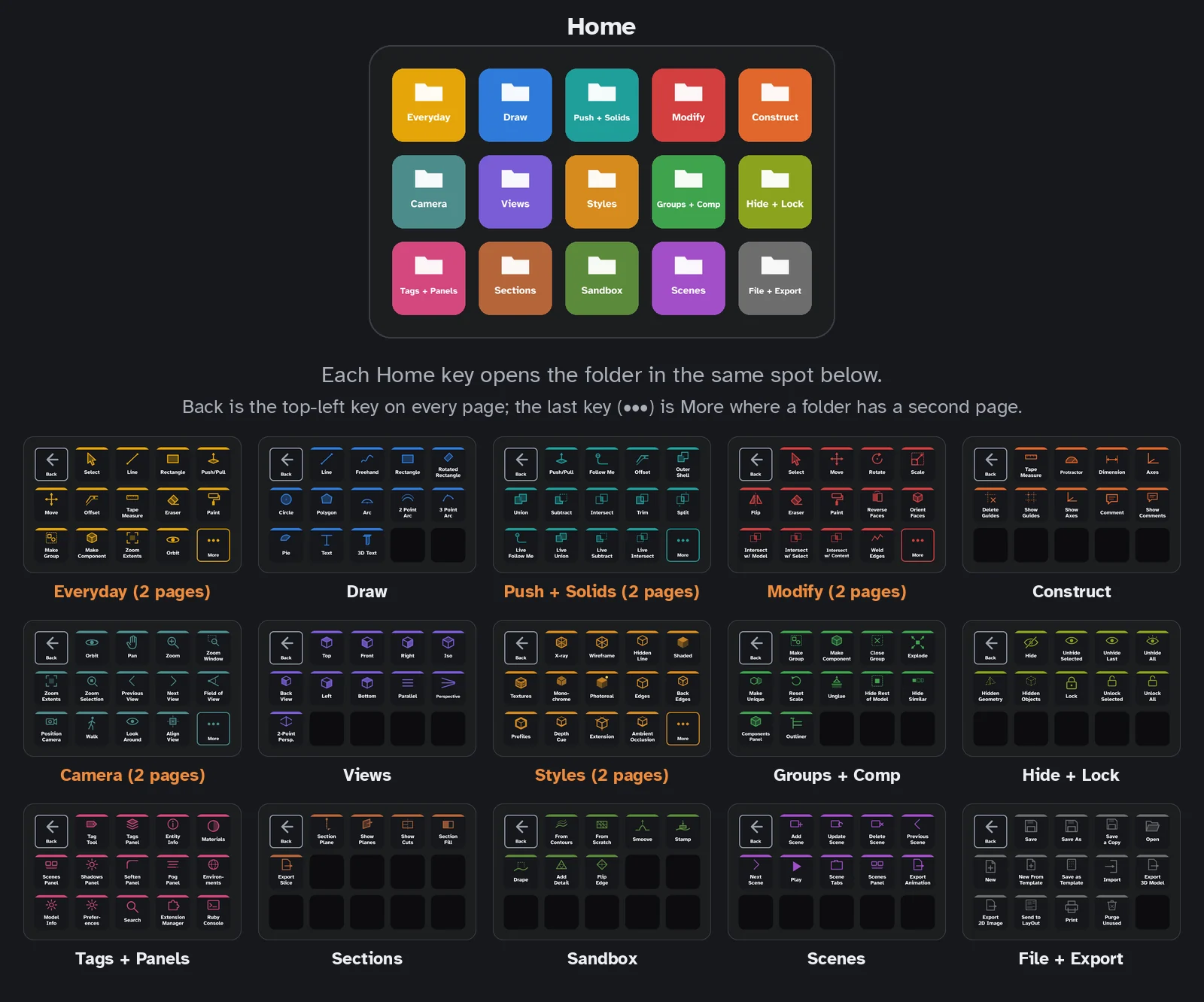
Page map
Fifteen folders by what you're doing. The back key is the top-left key on every page.
If a key does nothing
- Only the plain-letter keys work: step 1 isn't done yet. Import the file in the SketchUp version you use (each version keeps its own shortcuts).
- Nothing at all happens: click into SketchUp's drawing area once, so SketchUp has the keyboard, not another window.
- A character appears or the wrong thing happens: the keys are sent as an English (US or UK) keyboard. On layouts with AltGr, some Ctrl+Alt keys can type a character instead; switch Windows to an English layout while you use the deck.
- One of your own shortcuts changed: it used the same chord as a pack key. Import the backup from step 1, or give yours another chord in the Shortcuts panel.
- Grey command: some commands need the right moment (something selected, a group open, a section plane, Sandbox terrain). That's SketchUp; the key still sends it.
- On a Mac: SketchUp for Mac can't import shortcuts, so only the keys that send SketchUp's default shortcuts work there.
Undo the setup
Delete the profile in the Stream Deck app. In SketchUp, open Window › Preferences › Shortcuts and import the backup you exported in step 1, or click Reset All to go back to SketchUp's defaults.
Not affiliated with or endorsed by Trimble Inc. SketchUp is a registered trademark of Trimble Inc. Stream Deck is a trademark of Elgato / Corsair.