Mode Deck 3D setup
Stream Deck keys that follow Blender: the deck turns with the mode, and every key lights from what Blender is really doing. Three steps, about two minutes.
- Blender 4.2 or later on Windows
- Stream Deck MK.2, XL, + and Neo
- No shortcuts to set up
1The plugin
Install Mode Deck 3D from the Elgato Marketplace
Open the Stream Deck app, then Marketplace, and search for Mode Deck 3D. There are two:
- Mode Deck 3D ($19.99): Follow, mode, tool and toggle keys with lamps, Render with progress, timeline and sculpt brush dials, any operator on a key, and five pages per device (Home, Modeling, Sculpt, Animation, Shading / Render).
- Mode Deck 3D Lite (free): one MK.2 page with Follow, the Object, Edit, Sculpt, Pose and Weight Paint mode keys, and Render.
When the plugin starts, it copies a small add-on called Mode Deck 3D (Stream Deck) into the add-ons folder of every Blender 4.2 or later it finds. The keys talk to that add-on on your own PC only.
2Blender
Turn on the add-on once
- Open Blender (or close and reopen it if it was already open).
- Edit › Preferences › Add-ons, and type Mode Deck in the search box.
- Tick Mode Deck 3D (Stream Deck). Blender keeps it on from then on (if you turned off auto-save of preferences, use the menu at the bottom left › Save Preferences).
Your keys stop saying "Turn on Mode Deck 3D in Blender's add-ons" within a second. Installed Blender by hand somewhere the plugin can't see? Install the add-on from the zip below with Preferences › Add-ons › Install from Disk.
3Your Stream Deck
Pick the profile
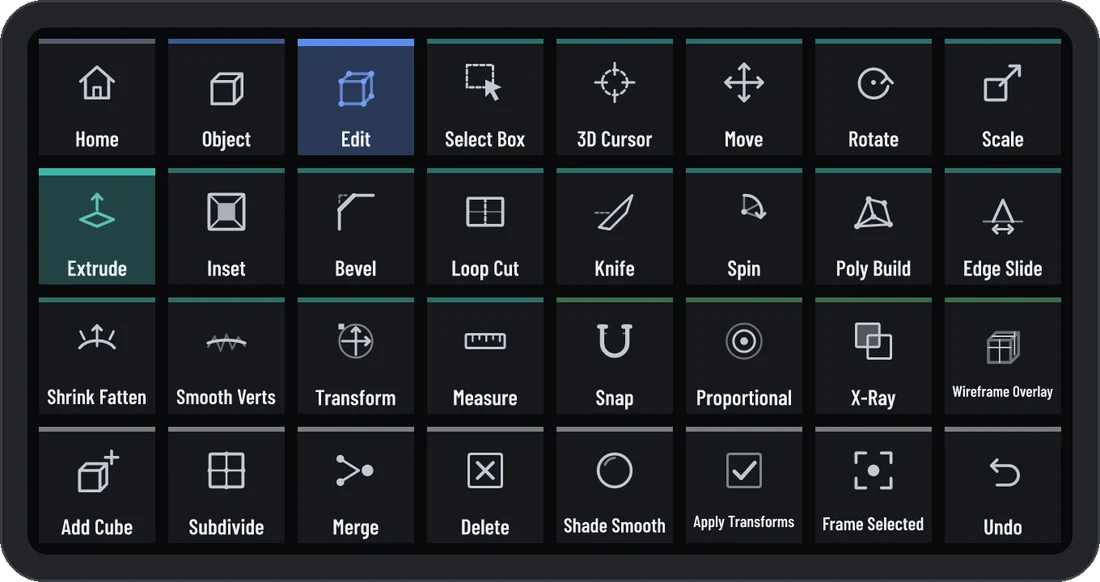
- Installing the plugin adds its profiles to the Stream Deck app: Mode Deck 3D MK.2 (15 keys, also the original Stream Deck), XL (32 keys), Plus (8 keys + 4 dials) and Neo (8 keys). Pick the one for your device in the profile list at the top of the app.
- Leave the Follow key on: Tab into Edit Mode and the deck turns to Modeling, Sculpt Mode brings the brushes, Pose Mode the animation page. Home is in the same place on every page.
- Any key can be changed: drag an Any operator action onto it and pick from the list, which is read from your own Blender.
On a Stream Deck +, the dials are: the frame (turn to scrub, press to play or stop), brush radius and brush strength in Sculpt Mode, and the shading mode.
What a key message means
| Blender is not running | Open Blender. The keys connect by themselves within a second or two. |
|---|---|
| Turn on Mode Deck 3D in Blender's add-ons | Blender is open but the add-on is off: do step 2. |
| Blender is busy | Blender hasn't answered for a few seconds: it is compiling shaders (the first Material Preview can take half a minute), baking or showing a dialog. Wait; the keys come back by themselves. |
| Not here | Blender greys that out where you are (a mesh tool in Object Mode, a brush outside Sculpt Mode, a mode with no object selected). Same as Blender's own menus. |
| no operator … / no tool … | Your Blender has no operator or tool by that name (an older build, or an add-on that isn't on). Pick another one in the key's settings. |
| no 3D view open | The key needs a 3D Viewport in the open window. Switch to a workspace that has one, such as Layout. |
| already rendering | A render is still running. Wait for it, or press Esc in Blender to stop it. |
The add-on and its source (GNU GPL)
The Blender add-on is free software under the GNU General Public License v3 or later. It is plain Python, so the add-on is its own source: mode-deck-3d-addon-1.0.1.zip (with the licence). The same files come inside the plugin.
It opens a socket on 127.0.0.1 only, never the network, and answers only the plugin, which proves itself with a key written to your user folder. It reads Blender's mode, tool, toggles, frame and render progress, and runs what a key asks for. Nothing is sent anywhere.
Undo the setup
Uninstall the plugin in the Stream Deck app. In Blender, Edit › Preferences › Add-ons, find Mode Deck 3D, untick it and pick Uninstall from its menu.
Tested with Blender 4.2.23 LTS and Blender 5.3.0 on Windows 11. Not yet on a physical Stream Deck. Windows only for now. Built by Tomorrowish with AI-assisted coding.
Not affiliated with or endorsed by the Blender Foundation. Blender is a registered trademark (®) of the Blender Foundation in EU and USA. Stream Deck is a trademark of Elgato / Corsair.