Keys for Fusion setup
Stream Deck keys that run Fusion's own commands, light up while a command is open and switch pages with your workspace. Three steps, about two minutes.
- Fusion on Windows
- Stream Deck MK.2, XL, + and Neo
- No shortcuts to set up
1The plugin
Install Keys for Fusion from the Elgato Marketplace
Open the Stream Deck app, then Marketplace, and search for Keys for Fusion. There are two:
- Keys for Fusion ($24.99): every command, six pages per device (Solid, Sketch, Surface, Sheet Metal, Manufacture, Drawing), Follow, parameter and timeline dials, views, visual style, show/hide and one-key export.
- Keys for Fusion Lite (free): one MK.2 page with 12 sketch and solid commands and a Design / Manufacture key.
When the plugin starts, it puts a small add-in called KeysForFusion in Fusion's add-ins folder (%APPDATA%\Autodesk\Autodesk Fusion 360\API\AddIns). The keys talk to that add-in on your own PC only.
2Fusion
Start the add-in once
- Open Fusion (or close and reopen it if it was already open).
- Press Shift+S (or Utilities tab › Add-Ins), then the Add-Ins tab.
- Pick KeysForFusion, tick Run on Startup and click Run.
From then on Fusion starts it by itself. Your keys stop saying "Add-in off" within a second or two.
3Your Stream Deck
Import the profile
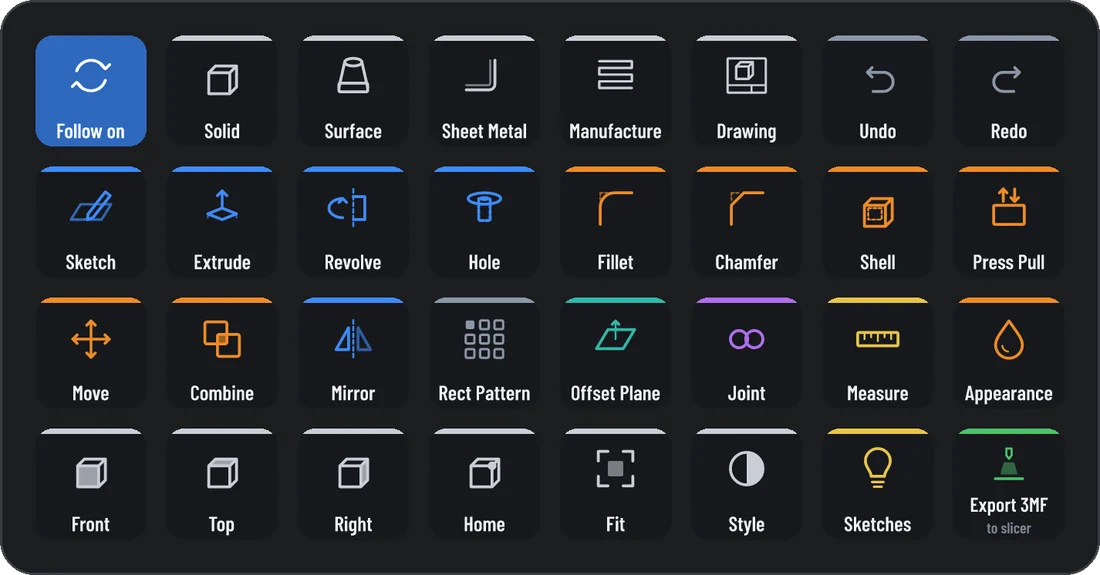
- Installing the plugin adds its profiles to the Stream Deck app: Keys for Fusion MK.2 (15 keys, also the original Stream Deck), XL (32 keys), Plus (8 keys + 4 dials) and Neo (8 keys). Pick the one for your device in the profile list at the top of the app.
- Leave the Follow key on: the deck turns to the Sketch page when you start a sketch, to Manufacture when you switch workspace, and back when you finish.
- Any key can be changed: drag a Command action onto it and pick from the list, which is read from your own Fusion.
On a Stream Deck +, the four dials are: a user parameter (turn to change it, press to put it back, tap the screen for the next one), the timeline marker, zoom, and the visual style.
What a key message means
| Fusion off | Fusion isn't running. Open it. |
|---|---|
| Add-in off | Fusion is open but the add-in isn't running: do step 2. |
| Add-in old | The plugin updated its add-in. Restart Fusion once. |
| Fusion busy | A dialog or a long compute is open in Fusion. Close it or wait. |
| Not available here | Fusion greys that command out where you are (a sketch command outside a sketch, a CAM command in Design). Same as the toolbar. |
| Not in this Fusion | Your Fusion has no command by that name (an older or newer build, or an extension that isn't installed). Pick another one in the key's settings. |
| Open a design first | Views, parameters, timeline and export need a design open. |
| Select a body or component | The export key exports what you select; with nothing selected it exports the whole design. |
Where exports go
The Export key writes 3MF, STL or STEP to Documents\Keys for Fusion exports (change the folder in the key's settings) and can open the file in your slicer.
Undo the setup
Uninstall the plugin in the Stream Deck app. In Fusion, press Shift+S, stop KeysForFusion and untick Run on Startup, then delete its folder from %APPDATA%\Autodesk\Autodesk Fusion 360\API\AddIns.
Tested with Fusion 2706.1.17. Not yet on a physical Stream Deck. Windows only for now. Built by Tomorrowish with AI-assisted coding.
Not affiliated with or endorsed by Autodesk. Autodesk and Fusion are trademarks of Autodesk, Inc. Stream Deck is a trademark of Elgato / Corsair.